Posts

Showing posts with the label Linux

fsck (for "file system check" in linux) - equivalent to chkdsk (checkdisk in windows)

 fsck (for "file system check" in linux) A system administrator can also run fsck manually if they believe there is a problem with the file system. Because running fsck to repair a file system which is mounted for read/write operations can potentially cause severe data corruption/loss, the file system is normally checked while unmounted, mounted read-only, or with the system in a special maintenance mode that limits the risk of such damage. A journaling file system is designed such that tools such as fsck do not need to be run after unclean shutdown (i.e. crash). The UFS2 Filesystem in FreeBSD has a background fsck, so it is usually not necessary to wait for fsck to finish before accessing the disk. The modern and faster ZFS in FreeBSD, FreeNAS and PC-BSD has no "fsck" repair tool; instead, it has a repair tool called "scrub" which examines and repairs Silent Corruption and other problems. Additionally ZFS uses copy-on-write, intelligent data scrubbin...
Configuring Samba File (smb.conf) for sharing linux folders into windows KVM

Default Path of Samaba in Redhat Enterprise linux 6: /etc/samba/ Default Samba file (smb.conf) contains the following in my linux Machine: [global]     ## OPENCLIENT GLOBAL KVM CONFIG ##         workgroup = LINUXKVM         server string = Samba Server Version %v         interfaces = lo virbr0         log file = /var/log/samba/log.%m         max log size = 50         security = share         load printers = yes         cups options = raw [shared_ammar_rasheed]     ## OPENCLIENT SHARE KVM CONFIG ##         comment = Temporary file space         path = /home/ammar_rasheed       ...

Mount KVM Virtual Drive to a folder in Redhat Linux

Default Path for KVM Images (in Redhat Enterprise linux 6): /var/lib/libvirt/images/<Kvm_filename.qcow2> Command Format: guestmount --rw -a <source image path> -i <destination image path> Example: guestmount --rw -a /var/lib/libvirt/images/Windows_7_-KVM.qcow2 -i /media/Ammar/mount/

Finding All Hosts On the LAN - Windows/linux

Finding All Hosts On the LAN From Linux / Windows Workstation Linux: @ Root Prompt type: for ip in $(seq 1 254); do ping -c 1 192.168.1.$ip>/dev/null; [ $? -eq 0 ] && echo "192.168.1.$ip UP" || : ; done Output: 192.168.1.1 UP 192.168.1.1 UP 192.168.1.2 UP 192.168.1.5 UP ...... ... .. 192.168.1.254 UP Windows:   c:> for /L %I in (1,1,254) DO ping -w 30 -n1 192.168.1.%I | find "Reply" or FOR /L %i IN (1,1,254) DO ping --a --n 1 10.0.1.%i | FIND /I "Reply">> c:\lanipaddresses.txt    

Wireless LAN Signal Strength Analysis Commands

************** For Windows: ************** netsh wlan show networks mode=ssid and netsh wlan show networks mode=bssid ************* For Linux: ************* To display WiFi signal strength in the terminal, you can run this command: watch -n 1 "awk 'NR==3 {print \"WiFi Signal Strength = \" \$3 \"00 \"}''' /proc/net/wireless" watch -n 1 cat /proc/net/wireless iwconfig "Interface-Name-Here"          example:         iwconfig wlan0         or         iwconfig wlan1         or         watch -n 1 iwconfig wlan1    [for continuos observation of the link] Wifi Signal Strength(Link Quality) in Percentage: while [ 1 ];do clear;echo "WiFi Signal Strength (Link Quality)";a=$(/sbin/iwconfig wlan1 | grep "Link Quality" | awk '{print $2}' ...

Hack Emails Password using BackTrack 5 (Man in the middle Attack)

Quick way to hack SSL password Requirements: 1. One Laptop Install BT-5 2.Working Wireless Lan Card and connected to any hotspot 3. SSLStrip installted 4. Etthercap installed 5.urlsniffer installed 6. aprspoof installed 7. Basic knowledge of linux and network Note: If you will try it using BackTrack-5 all will come pre-installed Be aware —you can only sniff email addresses and passwords on the same LAN, which means not on a remote computer outside the network. Step 1: In the first step we have to make sure that we are connected to a Wifi network and scan the available online node by using any network scanning software Step 2: One we know find the victim run this command and keep it running on the shell. This command will spoof the ARP request towards your PC arpspoof -i wlan0 -t 192.168.2.149 192.168.2.1 Explanation: aprspoof -i Network interface card IP-OF-VICTIM ROUTER-IP-ADDRESS Where -i switch is to define the interface in my case I used wireless so its ...

Qemu - Stuff in GNS-3

Login Details: First Login: id: root pass: root 2nd Login su <enter> password: root Assigning IP Address and Default Gateway Configure IP For Qemu : root@box:$ Ifconfig eth0 192.168.1.11 netmask 255.255.255.0 Configure GW For Qemu : root@box:$ Route add default gw 192.168.1.1 eth0 How to keep QEMU (Microcore) settings across reboots in GNS3 After you have edited settings in /opt/bootlocal.sh   and saved them you have to run /usr/bin/filetool.sh -b to ammend the image appropriately! Basic network config would be something like: ifconfig eth0 x.x.x.1 netmask 255.255.255.0 up route add default gw x.x.x.254 Delete a default gateway: route delete default gw 10.0.0.1 Also check this link for more details: http://forum.gns3.net/topic1657-30.html  

Set Root Password in Debian Linux

sudo passwd root

Webmin

What is Webmin? Webmin is a web-based interface for system administration for Unix. Using any modern web browser, you can setup user accounts, Apache, DNS, file sharing and much more. Webmin removes the need to manually edit Unix configuration files like /etc/passwd, and lets you manage a system from the console or remotely. See the standard modules page for a list of all the functions built into Webmin, or check out the screenshots. for more info: http://www.webmin.com/  

KVM – KERNEL BASED VIRTUAL MACHINE

www.redhat.com/f/pdf/rhev/DOC-KVM.pdf BACKGROUND Virtualization has begun to transform the way that enterprises are deploying and managing their infrastructure, providing the foundation for a truly agile enterprise, so that IT can deliver an infrastructure that is flexible, scalable, and most importantly economical by efficiently utilizing resources. 10 years ago virtualization was unheard of in the x86 market it was reserved for mainframe and high end UNIX systems. Over the last 3 to 4 years there has been exponential growth in the virtualization market both in terms of customer adoption and in terms of the rise of the number vendors in the virtualization space; from new hypervisor vendors to virtualization management vendors too numerous to mention. KVM Kernel-based Virtual Machine (KVM) project represents the latest generation of open source virtualization. The goal of the project was to create a modern hypervisor that builds on the experience of previous generations of techn...

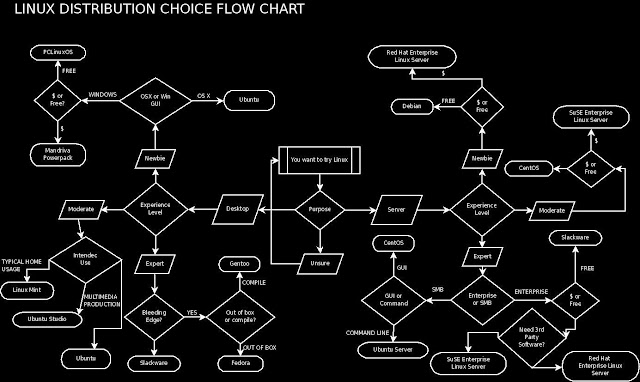
Linux Distribution Choice - Flow Chart

Image

BackTrack - A Linux-based penetration testing Distribution

Backtrack-Linux.org , home of the highest rated and acclaimed Linux security distribution to date. BackTrack is a Linux-based penetration testing arsenal that aids security professionals in the ability to perform assessments in a purely native environment dedicated to hacking. Regardless if you’re making BackTrack you Install BackTrack , boot it from a Live DVD or thumbdrive , the penetration distribution has been customized down to every package, kernel configuration, script and patch solely for the purpose of the penetration tester. http://www.backtrack-linux.org/